|
||||||||||
|
|
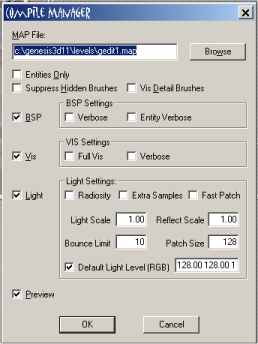
Lets run this and see how we did!The process of turning the program into a game is called compiling and it is very easy. You don't have to do a whole lot. The program handles most of it. Press the compile button . This brings up the compile manager : Uncheck the box called "Default Light Level (RGB) This is because you created your own light with your desired levels. You could forego creating lights and leave this default level on. This would create a uniform light level throughout the game. Make sure the "Preview" button is checked. Now hit the "OK" button and let the game compile. It will run Don't worry about any of the other check boxes. You can leave them at their default levels. Here's how it looks:
Here are some in game commands for testing your game: Pressing 1 or 2 toggles the blaster on and off Left mouse to fire blaster right mouse to jump up and down Esc to quit the game. Great Job! Your very first game room is complete. You no doubt have lots of ideas for this. You should go back and make a bigger a room so you can walk around and get a feeling for the game world. I suggest you play with textures and lighting then run the game to see how it looks. Enjoy the game you have created and continue to experiment with what you have learned. Part Two is ready ! If you have been waiting for more from this tutorial then continue on here! Here is what we are going to create in section two.
|
|
||||||||
Copyright©2001-2016 Kalif Publishing - Contact, copyright and Disclaimer - Let's Make Something T - Storm the Castle T Publishing
|
||||||||||






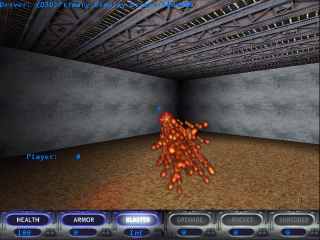 This
screen shot shows the single room game you played. You can run, jump,
fire weapons. Fool around with it and get a taste for it because this
is just the beginning.
This
screen shot shows the single room game you played. You can run, jump,
fire weapons. Fool around with it and get a taste for it because this
is just the beginning.