|


I have a youtube channel with over 700 Videos!
Video Game Making Home Page

Hi, Thanks for visiting my website. My name is Will and if you have questions
or would like to
contribute projects or ideas you can contact me 
|
Make a video Game
Now let's add a Player
The Player we will select already has characteristics and behaviors attached
to it. So we will just plug him right into the game. Switch to template
mode by pressing the template button  . Select the template tab
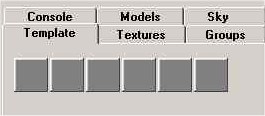
Then pull down the drop down menu and select DeathMatchStart entity.
Hit the lightbulb button  and hit enter. To move it to a desired location:
Click the select mode button 
Single click on the x that represents this entity.
Click on the move rotate button 
then click and drag the entity to the desired location.
Okay! Ready for the good news? Lets put this all together, make it into
a real room and run it as if it were a game. You are going to be able
to walk around in it and see the fruit of your labor
.Continue
on to page 9
|
|



