Diorama Man


Make a Miniature Castle and Dragon Diorama inside a light bulb Part 4 - adding the lighting

The batteries and the lighted tower

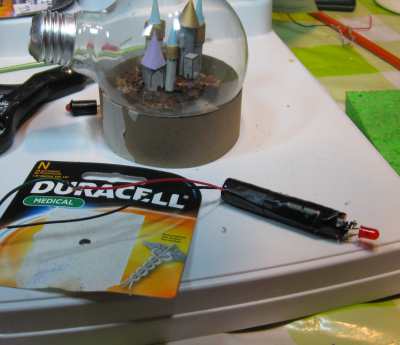
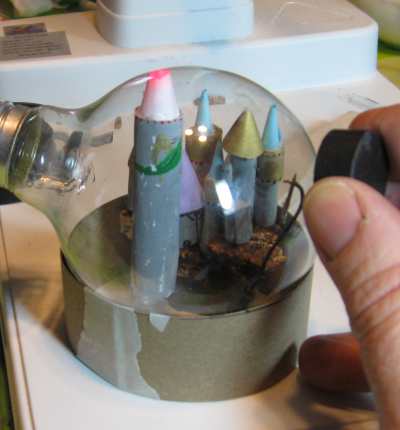
The largest tower inside the diorama is actually a stack of two batteries. I used medical grade N size batteries. At the top of the tower is an LED or Light Emitting Diode. Thats the little red bulb. I needed two batteries because each battery is 1.5 volts and the LED needs 3 volts to operate. If you use AAAA batteries you just would make two towers and wire them together. This way each tower fits into the bulb.


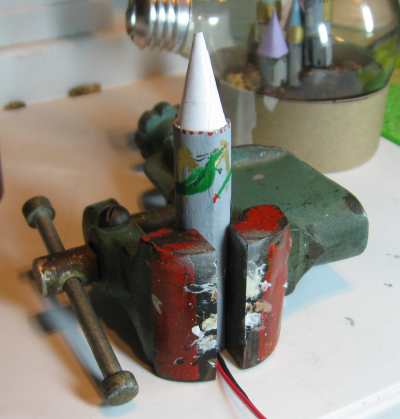
The tower is complete

In this picture you can see the tower is completed. I wrapped the battery tower with paper then painted it with gray paint and even put a little painting of a dragon on there. The cone at the top is a single sheet of thin white paper. The LED is right under this so I want the whole cone to light up when the LED lights up.


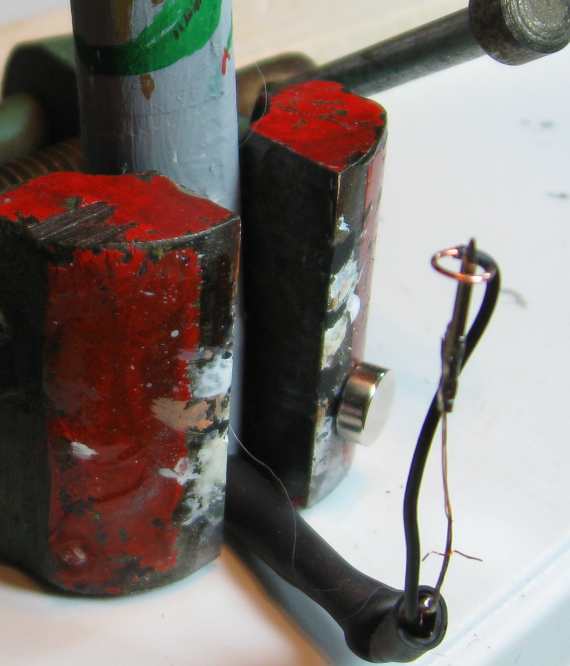
The picture below is a close up of the little switch I made. This is the switch that is sensitive to a magnet. You can see it is two parts. The first part is a wire that sticks straight up and at the end of it I have soldered the iron piece of a little push pin. You need that little iron piece on there because it will be moved by the magnet. Regular wire is non magnetic and a magnet won't affect it. The second wire goes up and forms a ring around the pin. In the normal position the pin is not touching any point of the ring. When you put a magnet near it the metal pin is pulled and touches the ring. This completes the electric circuit and the light goes on.

Note how the center wire is made up of only two strands of copper wire. This is so it is strong enough to stand up straight yet can easily be moved by a magnet. But once the magnet is removed it springs back to its original position right in the center with no connection. This type of setup is called a magnetic reed switch and you can easily buy one. Or you can make one like I did.

Close up of the magnetic reed switch

You don't have to do this kind of setup. I just think it makes the diorama a little bit magical in that you can activate the tower light with just a magnet from outside the bulb. You can go an easier method and run the wire from the light to the opening in the bulb socket and put a little switch right there.

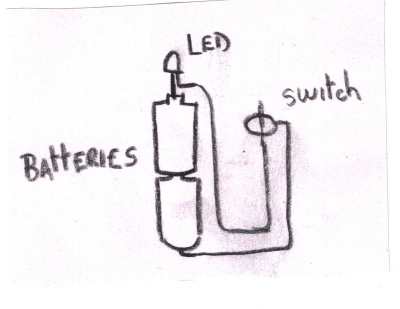
Here is a wiring diagram that shows how the lighted tower is wired. Notice the two batteries that are connected together and the led connects to one end. The other end of the battery connects to the led eventually through the little reed switch we made.

A couple of notes about the LED. These little lights need to be hooked up to the correct polarity + and - . So you have to test it before you assemble it! Make sure it lights up. Generally if you have a new LED the two leads are of different lengths and the longer one is Positive (+). Or you can look at the leads from the end and see that one of them has a flat side. This one with the flat side is the negative (-).

And, different LED's have different voltage requirements so you have to experiment with batteries. Most LED's need at least 1.8 volts to work which means a single battery won't do it. But there are also many leds which need 2.4 volts which is good, and some that need 3.6 volts which means another battery.

Now all you have to do is install the tower into the lightbulb and you are done. Bringing a magnet near the reed switch activates the light!

Return to the Diorama Main Page


Custom Search

This is a Storm The Castle Website


Types of Dioramas to Make

STORES

Plastic Models


Check out the Diorama and Miniature store

*Short Diorama Tutorials*

OTHER PROJECTS

How to sculpt Miniatures

Weapons/Armor Projects

Build A Trebuchet!

Build A Catapult

Make a Paper Castle

How to make a video game

Make a cardboard Samurai Sword

Make a Cardboard Medieval Shield

Make Model Rockets

How to Make a diorama

How to Make a Shoebox Diorama

How to make a fantasy shadowbox

How to Play Classical guitar

Fantasy Art Lessons

Make the ultimate terrarium

Make a Dragon Pinata

How to make a volcano

Make Origami

Blacksmithing

Paper Mache Projects


Diorama Links and Resources


My Youtube Channel

Twitter - Follow Me

Banner Exchange

---------

All Materials, unless otherwise stated are Copyright©2001-2012
Kalif Publishing and StormtheCastle.com


Hi, Thanks for visiting my website. My name is Will and if you have questions
or would like to
contribute you can


---------