Sites
Heroic Dreams - The Epic Fantasy Blog for daily news and information
CastleFiction.com The fantasy and science fiction website
Epic-Fantasy.com The Webs epic fantasy site
SUBJECTS
Classical
Guitar
Little Wonders
Astronomy
Video
Game Design
Art &
Drawing
For Writers
For Webmasters
The Meaning
of Life
THINGS
Essays
& Stories
Serendipity
Engine
Webmaster
linkswap
Beyond
Harry Potter
The
Penny Quest
STORES
Posters
Dioramas
and miniatures
BLOGS
TSFTMOL
Misguided
Brilliance
Essays
MORE
---------
All Materials, unless otherwise stated are Copyright©
Kalif Publishing and StormtheCastle.com
If you have questions
or would like to
contribute you can
---------
Earning money with your website
Babes of science fiction & fantasy
| Return to Home Page |
| Modifying your 404 Fault Page |
|
This is a simple technique that can greatly increase the flow of happy traffic to your website.
|
|
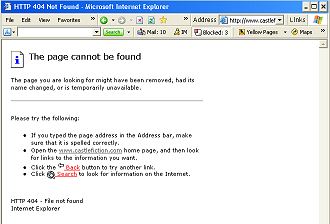
Everyone who surfs the internet knows what this page looks like. It is a default page that shows up when your browser can't find the exact page it is looking for. What happens when this page comes up? Most of the time the user just clicks the back button and goes to another site. This means you just lost a browser that was interested in your site. How do you fix this? You custom make a fault page in the same format
as the rest of your website. A custom page that has links on it and
possibly even a search engine. Now the user is inside your website and
has the ability to easily look for the information he or she needs.
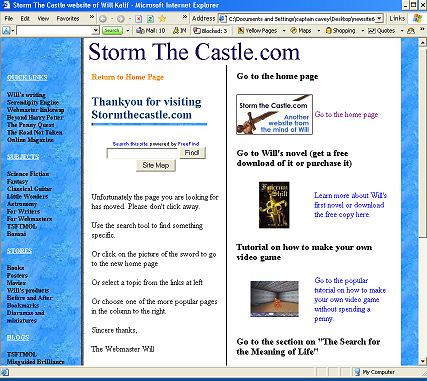
So How do we do it? There are a few different ways to do this and different server companies have different requirements for this. You should contact your hosting company and ask them what is required. But here is the most common method that works with most hosting servers. Step 1: Create your custom 404 page in the same way you create all your other pages, using Dreamweaver, Frontpage or any other software you use. Be sure to make it complete. Add direct links to the major aspects of your website. Make the page look like the rest of your site. Heres an example of the fault page for this website:
Can you see what I have done here? Your web visitor doesn't even realize he is in a fault page. And it has lots of information about all the important points in the website and it also has a search engine. So the visitor accepts this as normal, rather than a fault, and chooses what he came looking for. |
| Step 2: Save this file in the main directory of your website as "notfound.html" There is some code that will look for this page if it is needed. Do not save it with the quotes around notfound.html. |
|
Step 3: Using notepad or any plain text editor create a file called .htaccess (the file has to be saved exactly as .htaccess with the starting dot and no extension on the end. No extension such as .txt or .doc. in this notepad file insert the line: ErrorDocument 404 http://www.stormthecastle.com/notfound.htm Of course change the stormthecastle.com with your web domain name. Now save this file to your root directory. When uploading this file to your directory you may have to choose the ascii format. Look for this option in your ftp software. Another note: Some hosting companies, such as mine, require that you first enable .htaccess. This means you have to find an option in your hosting company account website that enables it. For me it was just as easy as clicking one button. If you are unsure about this you should ask your hosting company how to do this. |