SUBJECTS
Fantasy Swords
Fantasy
Classical Guitar
Dioramas
Make Video Games
Model Rockets
Astronomy & Telescopes
Art & Drawing
For Writers
For Webmasters Miniatures
The Meaning of Life
Homebrewing Mead
How to Make a....
series of tutorials
Stop Motion Animation
Fantasy Art School
Terrariums
R/C Airplanes
Fantasy for Writers
Projects
Make a Trebuchet
Make a Paper Castle
Rocket Launcher
Make a Catapult
Make a Terrarium
Shoebox Diorama Sculpting Miniatures
Fantasy Diorama
Shadowbox Fantasy
Make a videogame
Rainforest Diorama
Stop Motion Animation
Make a Volcano
A Paper fantasy game
Make a boxkite
The Warcraft VR Chamber
The Big Wall Diorama
Make a cardboard sword
Dragon Pinata
Nature Walks
MY STORES
Dioramas & miniatures
Classical Guitar store
Telescope Store
Terrarium Store
Fantasy Art Books
Model Rocket Store
Siege Engine Store
R/C Airplanes Store
Swords
MORE
Earning money
with your website
Websites
The Telescope Nerd
The Fantasy Guide
Medieval Castles
Medieval Swords
Medieval Weapons
The knight Medieval
willkalif.com
make-video-games.com
All Materials, unless otherwise stated are Copyright©
Kalif Publishing and StormtheCastle.com
For more information or for customer support check out the copyright and information page
If you have questions
or would like to
contribute you can
---------


| Return to Home Page | |
| Your own free website continued -page 2 | |
 |
|
|
|
|
|
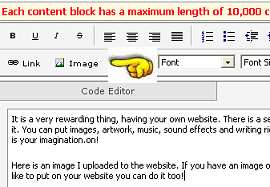
Lets put an image on the website. To do this you need an image on your computer that you can upload to the Bravenet server. It has to have this image so it can plug it into the website when people visit. I selected content block 2. I typed in some text and now I will insert an image. Click on the image button. The yellow hand in this picture shows you where it is.
You are in the image uploader. This is the process of finding an image on your computer and sending it to the Bravenet computer so it can be shown on your webpage. Select the Browse button and go to the image you want on the website. Then select upload. The image is now on the bravenet computer.
Continue with tutorial on next column of this page |
|
| {column1b} | |
| {column1c} | |
| {column1d} | |
| {column1e} | |
| {column1f} | |

|
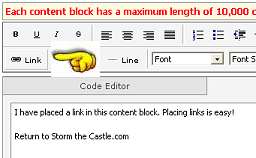
Tutorial continued from left hand column Type in the text of the link you want to make. I typed in Storm The Castle.com Highlight it then choose the link button (shown below by the pointing hand)
now type the address the link goes to in the pop up box. I typed in http://www.stormthecastle.com Save your page and continue on with the tutorial. Now you are step 4 of the process. Create a new page and call it about me. You can now do the same editing process that you did for your main page. Add text, images and links. Create as many pages as you like. Travel, writing , my artwork, ideas etc. Then push the publish button
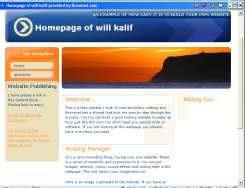
They give you a link to follow directly to your new website! Congratulations you now have a website. Here is a look at the site I made for this tutorial. Not bad!
Make sure you bookmark it so you can return. And be sure to remember your password for bravenet. Now continue on , build more pages, add a counter or lots of other free stuff that bravenet has. You are going to have a lot of fun. ANd be sure to tell your friends about your new free website. |
|