And here is a video I made showing this airplane coming out of the box and some short footage of me launching it off.
On the previous page I showed you the three basic motions of an airplane: Pitch, Roll, and Yaw and now we see how this controller operates these three functions. The controller also operates the Throttle!
The joystick on the left controls the throttle. Pushing this knob forward will accelerate the speed of the propeller and will make the plane go faster.
The joystick on the right controls the Pitch and Yaw of the airplane. The pitch of the airplane is the up or down motion and this is controlled by the elevators. Pushing this joystick foward will make the airplane pitch down and pulling the joystick back will make the airplane go up. And this same joystick controls the Yaw of the airplane. Pushing it to the left will turn the airplane to the left and pushing it to the right will turn the airplane to the right.
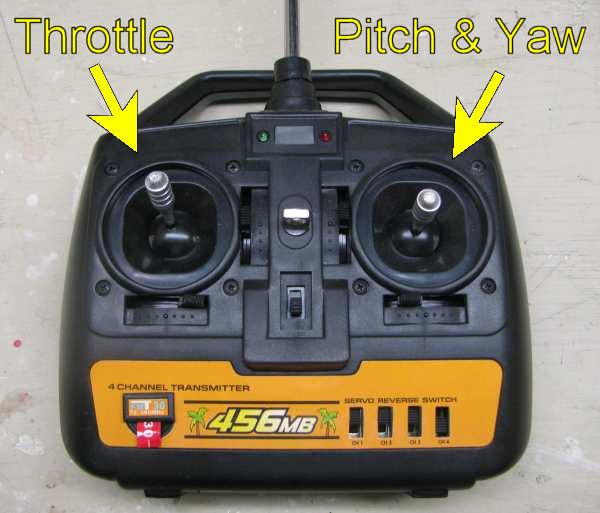
An interesting thing to note about these two joysticks is the normal position of them. The throttle joystick on the left is not spring loaded so it will rest wherever you set it. You can set it all the way down and the propellor will not spin. Or you can push it forward, finding a nice flying speed and then leave it right there and it will stay at that speed.
The joystick on the right, however, is spring loaded and will stay in the center location if not touched. And after pushing and releasing it will return to this center position. What this does is force the rudder or elevators to move thus causing the airplane to move in a new direction. Once the new direction is established you release the joystick and the rudder and elevator go back to the centered position and the airplane continues with its straight flight.
Example: If you want the airplane to go straight you don't touch the right joystick. If you want to make a turn you push the joystick to the left or right and once the turn is completed you release the joystick. If you want to do a big circle in the air you push the joystick to the left or right and hold it in position. If you want the airplane to do a big loop you push the joystick either forward or back and hold it there.
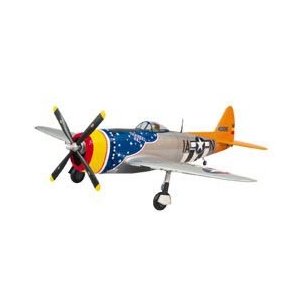
P-47D Thunderbolt Giant Scale Kit
The Giant Jug is Here! This is the 1/5 P-47D Thunderbolt "Gold Giant Scale Edition" Airplane Kit. This was modeled after the P-47D-30-RA attached to the 366th Fighter Squadron, 358th Fighter Group, USAAF, Tour, France, 1944.
This 1/5th Scale Warbird boasts Incredible Scale Accuracy, along with the Ease of Assembly made possible by Gold Edition Engineering.
FEATURES: Utilizes Familiar Wood Kit-Building Techniques, Tools and Materials Precisely Interlocking Parts Designed through AUTOCAD, and a thorough Photo-Illustated Manual Helps Guide Modelers Through the Assembly Process. Balsa-sheeted exterior provides an ideal surface for scale finishing.
Easy to Build and Fly for the First Time Giant Scale Modeler In the Air, the Giant P-47D Delivers Scale Flying Performance, and its Large Size makes it Easy To See and Appreciate. IMAA (International Miniature Aircraft Association) Legal Uses a notable elliptical wing platform using the proven S8036 airfoil at the root and the S8037 airfoil at the tip. This Combination delivers excellent flight performance and stability. Fully-Symmetrical Wing Vacuum-Formed ABS Cowl Included Includes instructions and most parts for optional P-47D Razorback version (except Canopy).
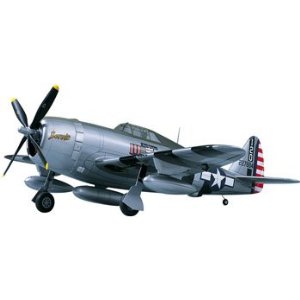
P-47 D Thunderbolt Gold Edition Kit .61-.90
Get a classic looking P-47D Thunderbolt with Legendary Gold Edition Quality / in This Great Kit from Top Flite. / / FEATURES: CAD engineered parts make building a breeze / Custom designed Selig airfoils improve flight performance / / INCLUDES: All the wood to build the kit, plastic cowling, clear canopy, nylon / engine mount (adjustable), decal sheet, pushrods, rolled plans, / building instruction book, CA hinges, and miscellaneous hardware. / / SPECS: Wing span: 63" Wing area: 713 sq.in. Length: 55" / Wing Loading: 27-32oz/sq ft Weight: 8-10lbs CG: 3-5/8" back / Airfoils: Root S8036 Tip S8037 from LE / / / REQUIRES: .61-.90 2-stroke or .91-.1.20 4-stroke Engine / 4-7 Channel Radio / 4-8 servos (2 servos for flaps, 1 for retracts, and 1 for bomb drops) / 3-Rolls of Covering and Matching Paint / Building and Field Equipment
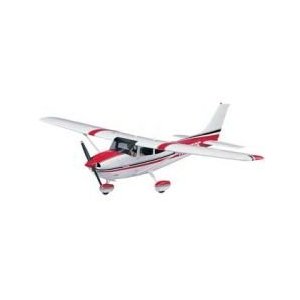
Cessna 182 Skylane Gold Edition Kit
The Classic Cessna 182 Looks You Want with Top Flite's Legendary Quality in this 1/5 scale Cessna Skylane. FEATURES: CAD engineered interlocking parts make building a breeze. ABS strips for the control surfaces easily simulate the full-scale Cessna's corrugated Fowler flaps, ailerons, and elevator. INCLUDES: All the Wood to Build the Kit, Plastic Cowling, Clear Lexan Wind- shields, Plastic Wheel Pants, Two-Piece Aluminum Landing Gear, Plastic Wing Fairings, Decal Sheet, Pushrods, Rolled Plans, Instruction Book, Adjustable Engine Mount, and misc. Hardware SPECS: Wingspan: 81"" Wing area: 906sq.in. Length: 64.5"" Weight: 10-12lbs. Wing loading: 23-28oz/sq.ft. Throws: Hi Rate Low Rate CG: 4"" aft of le @ root Elev 1-1/16"" each 3/4"" each way Flaps: 1"" Takeoff Rud 1"" each way 5/8"" each way 2"" Landing Ail 5/8"" each way 1/2"" each way REQUIRES: .61-.91 2-stroke or .91-1.20 4-stroke Engine 4-6 Channel Radio 5-7 servos (ailerons and flaps use two servos each) 5th and 6th channels for optional flaps and lights (see ACG for info) 4-plus Rolls of Covering Building and Field Equipment
 The HobbyZone Sports Cub S RC Airplane The HobbyZone Sports Cub S RC Airplane
- Everything you need to fly RC today
- SAFE technology from Horizon Hobby
- Recovery with the pull of a trigger with Panic Recovery mode
- Proportional 4-channel control with working throttle, rudder, elevator and aileron
- Steerable tail wheel for easy ground control
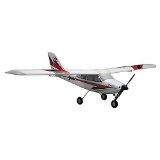 E-Flite Apprentice S 15e RTF Beginner RC Airplane with SAFE Technology E-Flite Apprentice S 15e RTF Beginner RC Airplane with SAFE Technology
SAFE technology is a revolutionary leap forward in flight control and training. Key Features SAFE technology provides spatial awareness and flight envelope protection The ideal beginner's choice when learning to fly with an instructor Quick, easy assembly Lightweight and durable Z-Foam construction Powerful 15-size, 840Kv brushless out runner motor installed-flite 30A Pro Switch-Mode BEC Brushless ESC installed Large, easy-access battery compartment Wide-stance tricycle landing gear Nose wheel steering for better ground handling Powerful 3S 3200mAh 20C Li-Po battery included-Po balancing DC charger included Optional E-flite Apprentice S Floats (EFLA550), available Safe Technology Information Needed To Complete Nothing! Everything you need to get flying is included in the box. Overview The E-flite Apprentice S 15e RTF airplane is the most intelligent RC airplane ever offered by Horizon Hobby. At its heart is groundbreaking SAFE (Sensor Assisted Flight Envelope) technology that makes RC flight incredibly easy, even for the least experienced user. Its combination of spatial awareness provides flight envelope protection which adds a degree of security never before available, while its smooth flight capability battles windy conditions so that all you feel is control that's crisp and responsive. Multiple levels of flight envelope protection are provided that can be reduced or removed as your skills progress, yet the "panic" feature is always there to instantly return the model to level flight if you ever lose orientation.
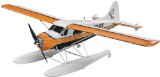 FlyZone DHC-2 Beaver Select TXR RC Airplane FlyZone DHC-2 Beaver Select TXR RC Airplane
- FEATURES: Construction: Aero Cell foam with pre-applied decals and tinted plastic windows at canopy area Wing: One-piece design with functional struts
- INCLUDES: Flyzone TX-R DHC-2 Beaver Select Scale Airplane with Brushless Motor, ESC, five Servos, SLT Receiver, Propeller, Instruction Manual, Spinner
- REQUIRES: Compatible SLT transmitter with at least 5 channels LiPo battery: 11.1V 1800mAh 20C battery Charger: AC/DC balancing charger Building
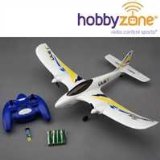
HobbyZone Duet RTF HBZ5300 Airplane
- Duet RTF, Everything you need to teach yourself to fly in one box, even the "AA" batteries for the transmitter
- Purpose of use for RC vehicles, Accessories and parts
- Manufactured in China
|