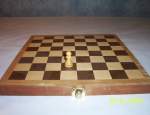
Step 1 - Think up your idea! What do you want to animate? Make it something easy for this first lesson in animation. It could just be a think that you move around on a table. And this is the example I will use for this first lesson. I am going to move a chess piece around on a chess board.
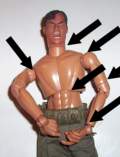
If you want to do something more sophisticated you can. For example if you want to make a toy, a model, or a figure move that would be great but there is something to think about. It has to be able to move! It needs to be either pliable or have joints that can move. The model I used in my soldier animation has lots of joints. The black arrows show some of them. The joints mimic the human body so the model will move in realistic ways. And when it is moved the joints stay where I moved them which is very important. You don't want it snapping back to it's original form. You have to move it. Take a picture, then move it some more.
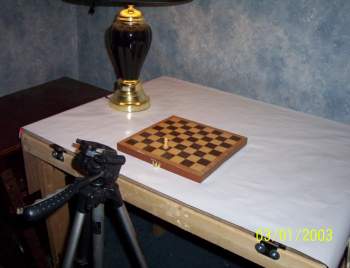
Okay, you have your idea and you have the materials. Now set up your workspace to do your animation. I have the chessboard laid on a table and I have my tripod next to it. The lamp is to give additional lighting for the pictures.
Lighting is a big concern when it comes to animation. It is always good to take a sample picture or two and look at them to see if it looks right and if the lighting is good.
About the Tripod: You don't have to use a tripod, but you have to do something to keep the camera steady! It has to remain in the same spot for all the pictures or else the animation won't come out right! So, tape it down or tape it to a board or secure it down in one spot with rubber bands! Do anything you have to do to make sure the camera never moves, especially when you press the button to take a picture.
A Note about Digital Cameras
Many digital movie cameras have the ability to do single frame pictures. You might have one of these cameras and you can use that. It's the same exact thing. Also, set the resolution to the lowest setting on whatever camera you use. No need to take high resolution pictures. It just takes up memory. Low resolution pictures will work and look great and be easier to use.
Set up your camera and your animation and take your first picture. Make sure you take a look at it to see that everything looks right and the lighting is good.
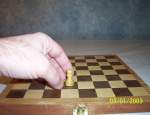
Now move the model to the next location. In this animation I am moving it one full square for every picture. This is going to make it a tiny bit choppy as an animation but that's ok. If I wanted to make it smoother I would move it less for each picture - maybe a half a square.
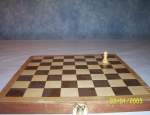
Continue moving the model in small increments. Take a picture after each move. Do this until you are satisfied and done with the whole motion you had planned. I moved the chess piece to the end of the board, brought it back then had it tumble right off the board. You will see my animation soon.
 Let's Continue and get these pictures into the computer Let's Continue and get these pictures into the computer
RESOURCES TO MAKING STOP MOTION ANIMATION
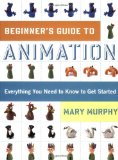 
Beginner's Guide to Animation: Everything You Need to Know to Get Started
To beginners, making an animated movie can seem like voodoo magic. And in fact, until recently, animation was expensive and time-consuming. But now with the help of Beginner's Guide to Animation, anyone can make animated movies, using a digital camera, basic software, and a computer. The book begins with an illustrated guide to setting up a simple animation studio at home, including a list of essential items. Then, new animators hit the ground running with six innovative, instructive projects designed to develop technical skills and explore the potential of animation. A full collection of scannable templates makes it even easier to get started and to finish up. Tips, tricks, and clear instructions on editing, scoring, even making your own show reels and shorts make this the complete one-volume guide to amazing friends and family-and everyone on YouTube!-with great I-made-it-myself animation.
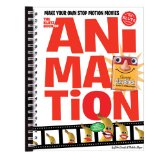 
The Klutz Book of Animation: Make Your Own Stop Motion Movies
Welcome to the wide-open world of animation. It used to take an empire the size of the Magic Kingdom to make an animated film. And to get viewers, you'd need access to cineplexes or television networks. In other words, you were either in the industry or in the audience. That was then. Today, creating animation for a potential audience of 600 million requires a laptop, a camera, and an internet connection. That's it. The barriers have come down, the people have taken over, and the results are amazing. The Klutz Book of Animation is a complete how-to treatment of this newly accessible art form. It combines practical instruction and ready-to-shoot scripts. Real-life samples of all the projects are viewable online - the perfect marriage of book and web. Speaking of web, the software you'll need is available as a free download. It's plug and play on any computer (PC or Mac). Attached to the book is a piece of low-tech, non-toxic clay, ready to be molded into a million different heroes starring in a million different films - all of them animatedly yours.
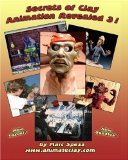 
Secrets Of Clay Animation Revealed 3!
Secrets of Clay Animation Revealed 3 is a book teaching all methods the experts use to make stop motion films from start to finish. After reading Secrets you will know how to create several types of armatures, learn how puppets are sculpted, make a motion control rig, light your sets, make your own surface gages, use video reference, chroma key, capture programs and more.
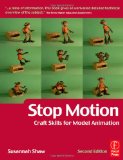 
Stop Motion: Craft Skills for Model Animation, Second Edition (Focal Press Visual Effects and Animation)
This authoritative primer of the craft skills required in model animation teaches the basic building blocks of the creation of character driven animation.

Do you like making projects and exploring a variety of hobbies?
Sign up for my free newsletter. I give you regular updates on hobbies and projects you can make. it is totally free and I don't share your email with anybody. |