Hi, Thanks for visiting my website. My name is Will and if you have questions
or would like to
contribute projects or ideas you can contact me
Make a 3d Stop Motion Animation using Playdoh and a Wire Armature
It's pretty easy to make a 3d stop motion animation with a little bit of wire and some clay. In this tutorial I take you through all the steps necessary. I also have a video that gives you a quick overview of what I did to make the armature for the animated lizard and I show you the materials I used for the animation. If you have never done any kind of animating I also have a tutorial on this site that shows you step by step how to use the free program called MovieMaker that comes with most Windows operating systems. Just look for the tutorial in the menu on the left. It's under the Tutorial Heading.
The Materials You need to do this tutorial
Wire
Pliers
Utility Knife
Playdoh
Digital Camera
Movie Maker or some other type of animation software
I use plain old house wire, the kind an electrician would use to wire a light into your home. It has three conductors inside it that are perfect for making the armature underneath a 3d model.
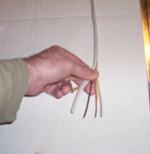
Using a utility knife cut open the sheath of the wire to expose the three conductors inside. Strip these wires out of the sheath and cut them into long pieces. Anywhere from 12 to 18 inches.
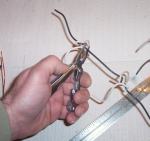
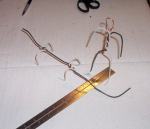
Now bend and twist the wires into the rough shape of your intended 3d animated figure. Make sure they are nice and tightly wound together. I am going to make a human shape and a lizard shape.
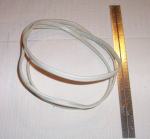
I have here in the picture two armatures. One is a human and one is a lizard. When making the armature try to think about what the skeleton underneath your final figure would look like.
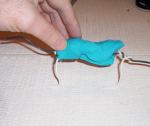
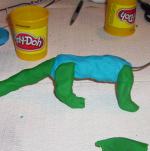
Now apply the dough or clay to the armature. Keep adding to it and make it into the desired shape. It is best to start out just with the main body shape and then once that is in place to start working on the details of the animated figure.
I am starting to flesh out the main body shape of the lizard.
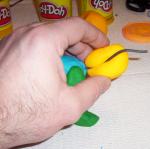
Here I am applying the head of the lizard. One of the nice things about using an armature is the ability to segment your animated character into separate parts. The head isn't really attached to the body. But it will look great and be easy to swivel around. With a little practice you will get a feel for this.
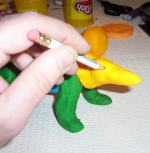
Experiment with tools when you start to work toward the details of your 3d animated character. In this picture I am creating small holes so I can insert the eyes.
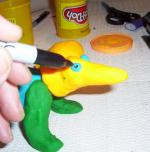
Now that the eyes are in place on the animation I color in the pupils with marker. The whole idea is to have some fun, experiment and be creative! So try different things. You really can't mess anything up. If it doesn't look right pull all the clay off the armature and start over.
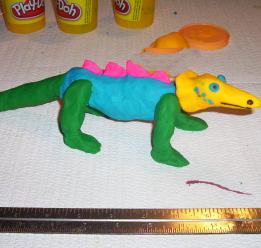
Here is my completed lizard - He is ready to be animated. Notice how I have added some details. That is how you should work. Start out with the rough aspects of the body shape then eventually work your way toward the details.
Now, I don't recommend, if you are using this type of dough to make too many details, particularly where you are going to bend and move the figure. Because you will be pressing on the model and moving it around and this will probably distort the details. Keep it pretty simple for your first couple of tries. It will take some practice to move the figure gently without distorting it.
Okay! Let's take a look at the animation I made. I added some clay flowers for the lizard to enjoy and I used some red thread as his tongue. Here is the tutorial and the animation video:
To beginners, making an animated movie can seem like voodoo magic. And in fact, until recently, animation was expensive and time-consuming. But now with the help of Beginner's Guide to Animation, anyone can make animated movies, using a digital camera, basic software, and a computer. The book begins with an illustrated guide to setting up a simple animation studio at home, including a list of essential items. Then, new animators hit the ground running with six innovative, instructive projects designed to develop technical skills and explore the potential of animation. A full collection of scannable templates makes it even easier to get started and to finish up. Tips, tricks, and clear instructions on editing, scoring, even making your own show reels and shorts make this the complete one-volume guide to amazing friends and family-and everyone on YouTube!-with great I-made-it-myself animation.
Welcome to the wide-open world of animation. It used to take an empire the size of the Magic Kingdom to make an animated film. And to get viewers, you'd need access to cineplexes or television networks. In other words, you were either in the industry or in the audience. That was then. Today, creating animation for a potential audience of 600 million requires a laptop, a camera, and an internet connection. That's it. The barriers have come down, the people have taken over, and the results are amazing. The Klutz Book of Animation is a complete how-to treatment of this newly accessible art form. It combines practical instruction and ready-to-shoot scripts. Real-life samples of all the projects are viewable online - the perfect marriage of book and web. Speaking of web, the software you'll need is available as a free download. It's plug and play on any computer (PC or Mac). Attached to the book is a piece of low-tech, non-toxic clay, ready to be molded into a million different heroes starring in a million different films - all of them animatedly yours.
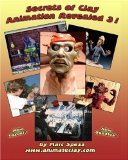
Secrets of Clay Animation Revealed 3 is a book teaching all methods the experts use to make stop motion films from start to finish. After reading Secrets you will know how to create several types of armatures, learn how puppets are sculpted, make a motion control rig, light your sets, make your own surface gages, use video reference, chroma key, capture programs and more.
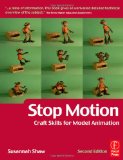
This authoritative primer of the craft skills required in model animation teaches the basic building blocks of the creation of character driven animation.
Do you like making projects and exploring a variety of hobbies?
Sign up for my free newsletter. I give you regular updates on hobbies and projects you can make. it is totally free and I don't share your email with anybody.