HOME
Fantasy Art School


Fantasy Genie Drawing using photoshopHow to Draw a Fantasy Genie

This lesson is on how to draw a Genie Using Corel Draw and Photoshop. It is submitted by Adel Radwan who has some significant skill and talent with drawing and with using Photoshop. He has the ability to capture a real and magical feeling with his artwork. In this lesson he shows us the steps to drawing a Genie.

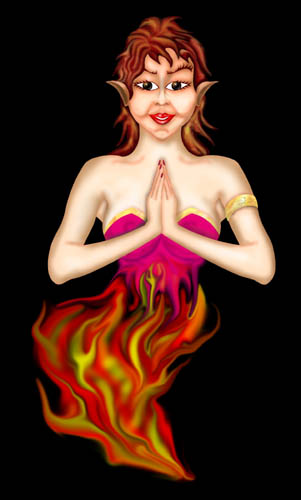
The Picture shown here is the Genie he has drawn for this lesson.

Most of the preliminary work was done in Corel Draw and then the picture was imported to Photoshop and colored.


Drawing a Genie Step 1

Drawing A Genie - Before beginning

First thing you should do is draw a sketch of the Genie on paper as you have imagined it. This sketch will be used as foundation for the work later on. The drawing is then finalized as line art. This is a necessary step because it will allow you to make the masks and selections so you can color it in Photoshop and will make the work easier in the further steps.

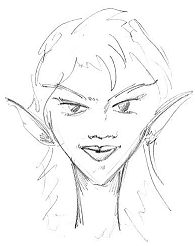
This is the artists drawing of his genie.


Now using Corel Draw the Artist Draws out the Genie

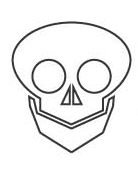
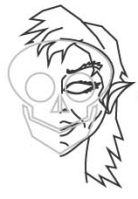
Step 1: (Using Corel Draw)Draw a simple skull for the Genie's Head. This is a good way to start. It will help you to define the correct proportions. And this is something you should often do with your drawings. It will help you to get the right proportions.

In Corel Draw the artist used simple curves to make this skull.  


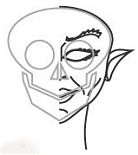
Step 2: Now draw in the skin and flesh around and over the skull. You can see now that the skull is a great base to work on. It very much helps you to get the shape and the look you want.


Step 3: Once the face and head are completed draw in the hair.


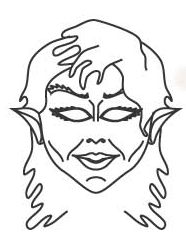
Step 4: Once you have completed the drawing of face, head, and hair you can now go ahead and remove the skull lines from the drawing. They were just a guide and are no longer needed in the drawing.

This drawing shows the completed genie head.


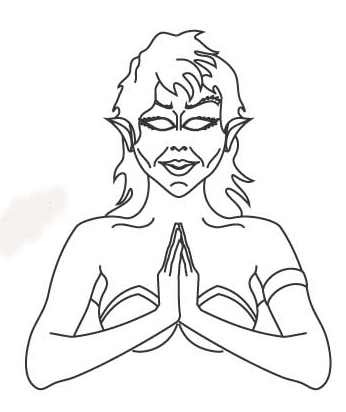
Step 5: Now draw the Rest of the Genie Drawing. You can try to draw it with lines or you can use the same process that we followed with the head by drawing in bones so you have a base to work the filling in the flesh and finally removing the bones once the outside of the drawing is done.

In the final drawing the artist has added flames. It wasn't necessary to draw them in ahead of time because they are easily added with Photoshop.

This picture is ready to be imported into photoshop.

Step 6- Select the final drawing and export it as AI file, it is better to put it in a rectangle (as a frame) to give space around the edges of the drawing when you open the file it in Photoshop.


Step 7- Open the file using Photoshop; this will enable you to make fine selections of the body parts and coloring them . Now save and admire your work!

This lesson was submitted by Adel Radwan. To see his other works go to the Fantasy art submissions section Fantasy Art by Web Visitors


Would you like to submit an art lesson for this site? If you have questions
or would like to contribute you can contact me as customer support

---------


This is a Storm The Castle Website


Fantasy Art School HOME PAGE

Fantasy Art Lessons

  1. lesson 1 - Holding the pencil and getting a feel for it and warming up with lines
  2. lesson1c how to draw a straight line
  3. lesson 2 - Drawing some simple geometric shapes
  4. lesson 3 - Understanding and using Perspective
  5. lesson 4- foreshortening in perspective
  6. lesson 5- Drawing depth and distance
  7. lesson 6-Using lines of varying thickness
  8. lesson 7- drawing form and shape with a medieval mace
  9. lesson 8- Drawing metal - We draw a medieval helmet
  10. lesson 9- drawing our first human form
  11. lesson 10- Distorting the human form to create fantasy creatures
  12. lesson 11 - doodling and creativity break
  13. lesson 12 - a Morning star mace - drawing textures
  14. lesson 13 - how to draw chainmail
  15. lesson 14 - How to convey action in your fantasy drawings
  16. lesson 15 - How to draw sword shapes
  17. lesson16 -draw an armored knight
  18. lesson 17 - Draw a fantasy dagger using the Five-S method
  19. lesson 18 - Creating space in your drawings - A Dragons Lair
  20. lesson 19 - Practice by drawing dragons
  21. Lesson 20 - Drawing from Memory
  22. Lesson 21 -Draw a Catapult

Fantasy Art Lessons from Guest Artists

  1. How to draw a magical genie using Corel and Photoshop


Art Books & Supplies

  1. Art Kits
  2. Art Books
  3. Fantasy Art Books


OTHER PROJECTS

ArtWork Submitted by web visitors and web students - Submit your artwork and have it displayed here in the Fantasy Art School!

WEBSITES

Stormthecastle.com
Castlefiction.com
The Telescope Nerd
Epic Fantasy.com
The Medieval Armory
THe Fantasy Guide

The Heroic Dreams Blog
Knight-Medieval.com willkalif.com
make-video-games.com


---------
All Materials, unless otherwise stated are Copyright©
Kalif Publishing and StormtheCastle.com check out my copyright page for information about how to use any work on this site

If you have questions
or would like to
contribute you can contact me as customer support

---------